

Report
HR Tech Leaders: Key Insights and Trends
Published:
Studio Agent brings agentic AI into Visier Studio. Ask questions and get instant guidance, or give it a data modeling task and it will plan the work and build it for you.
· 5M Read
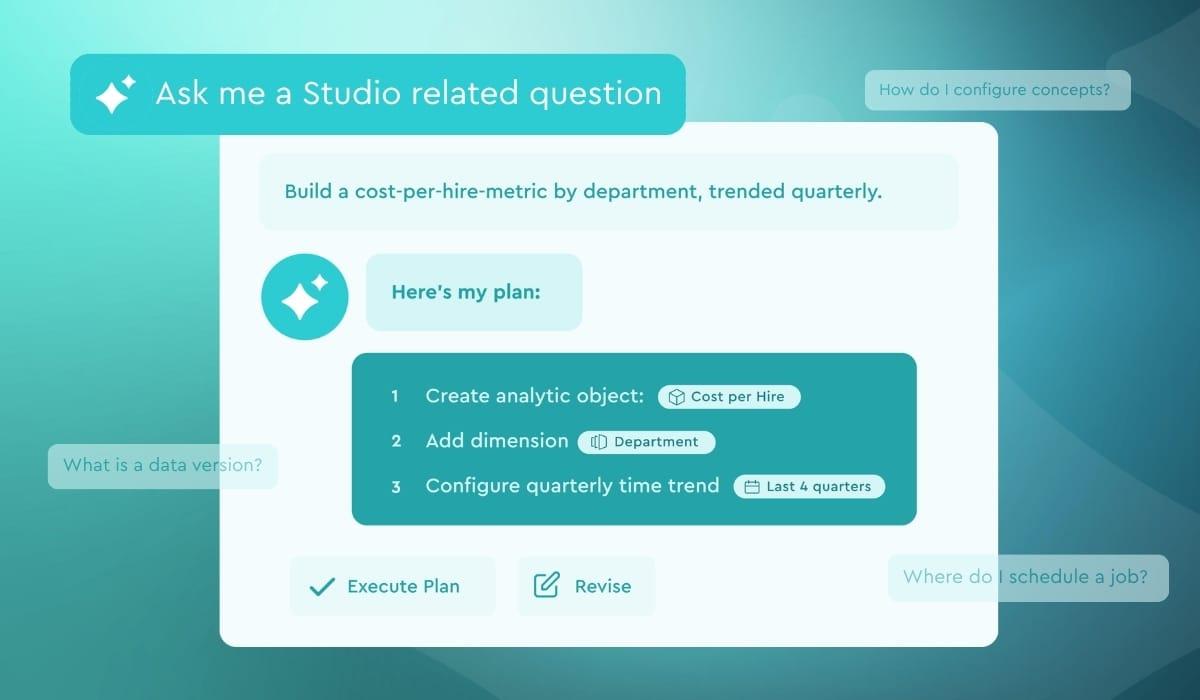
Visier Workforce AI now includes Studio Agent, the next generation of AI in Visier's main administrative portal, Studio.
Studio Agent is an evolution of Studio Assistant. Everything Studio Assistant did, including answering questions, explaining formulas, and linking you to the right page in Studio, is now available as Advise mode within Studio Agent.
Studio Agent also introduces Build mode. Rather than explaining how to create a metric or model an event, Studio Agent can now propose a plan and carry it out against your data model, with you reviewing each step before any changes are made.
Data modeling in Visier is powerful and flexible, and building the pieces that produce insights draws on expertise across several areas of Studio. Build mode puts that expertise at your fingertips, automating the execution of data modeling so you can get to a working model faster.
You can start with a broad business goal or a specific instruction. For example:
Broad goal: "I want to track referral metrics for my employees. Create the supporting data model."
Specific instruction: "Create an Employee Referral event linking the referring employee to the referred applicant with status and date."
In either case, Studio Agent explores your current data model and returns a plan for your review. You can:
Review and adjust the plan. Ask follow-up questions or edit the plan in the chat, and Studio Agent will revise it. Execution begins only when you select Execute.
Watch the build happen. Each step completes in view, so you can follow the agent's progress as it works.
Pause and resume as needed. Pausing holds your progress where it is, and you can return to the same project to resume.
Verify the results quickly. When execution completes, Studio Agent lists everything it created or modified, with each item linked to the relevant page in Studio.
Build mode runs inside a project, so changes are staged there and reach production only when you publish them. Studio Agent also operates with the same profiles and permissions as your user account. If you do not have Model write access, neither does the agent working on your behalf.
Advise mode includes all of the capabilities that Studio Assistant users know today.
Ask questions in plain language. Get step-by-step instructions on tasks like configuring concepts or scheduling a data job, with reference links and an Action button that takes you to the right page in Studio.
Get help with formulas. Describe what you want and Studio Agent will write the Visier formula. Use the Explain button to see what a formula does, or what an error means and how to fix it.
Get model-aware guidance. Studio Agent is aware of your tenant's subjects, events, metrics, and mappings, so its help reflects your environment. That context is richer than in Studio Assistant, and it is part of what makes Build mode possible.
Keep your context. Ask follow-ups without repeating yourself, reset for a new topic, or restore your last conversation after signing back in. Thumbs-up and thumbs-down help improve future answers.
Studio Agent is available now for Visier customers who have AI features enabled. Select the Studio Agent icon in Studio and choose your mode. Build mode also requires elevated permissions and is used from within a project, so if you do not see it, check with your admin team.
To learn more about how to use Studio Agent, check out our documentation (opens in a new tab).
Studio Agent is an AI-powered layer inside Studio, built for the admins, data engineers, and power users who create the workforce insights their organization relies on.
It works alongside you in one of two modes that you select:
Advise mode provides chat and explanations. You ask a question and receive clear, actionable guidance. It’s well suited to exploring an idea, learning Studio, or confirming an approach before you commit to it.
Build mode provides planning and execution in addition to what you get with Advise. You describe what you want to accomplish, and Studio Agent researches your existing data model, proposes a step-by-step plan, and then makes the changes once you approve them.
Because Build mode can make changes to your data model, it is worth explaining how Studio Agent handles your data.
Human review is required. Studio Agent does not act in Build mode without your approval of the plan. You can edit the plan before execution, pause it while it runs, and review all changes before publishing to production.
All agent activity is tracked. Actions taken by Studio Agent appear in the Changes tab in your project home, with a Studio Agent icon in the Edited By column, so your team can see which changes came from the agent.
Answers are grounded in Visier documentation. Studio Agent uses retrieval-augmented generation to draw on a curated library of Visier documentation and Visier University content, refreshed weekly to stay current with new features.
Your data remains yours. Studio Agent runs on Anthropic Claude models hosted in AWS. Our LLM partners are SOC 2 certified and have contractually committed to not persisting your data or using it to train their models. Anything Studio Agent processes stays isolated within your tenant scope, is never shared between customers, and is never used by Visier for training or fine-tuning. Queries and feedback are stored for 30 days, then purged
For more detail, see Visier's Bias Prevention and Transparency Statement and Studio Agent FAQ (opens in a new tab).
![[featured resource] hr-metrics](/_next/image/?url=https%3A%2F%2Fimages.ctfassets.net%2F3geimt851116%2F2Nr5NrpAhNZCL8qEJnDYWb%2F39c537705918616160da6079f1a75c7a%2F5CoreHRMetrics-DownloadImage-576x411.jpg&w=3840&q=75)
